



JarveePro Daily Q&A Diary – Oct. 13th, 2025 (Multi-platform automation, AI Agent setup, and content explorer issue overview)
Every day, JarveePro users send in questions about automation logic, AI integration, and account behavior. Below are some of the top discussions from today’s support team exchange and expert responses.
Question 1:
Can a dedicated residential IP be used for 1 Facebook account, 1 Instagram account, and one X (Twitter) account?
Answer:
Yes, you can technically use one dedicated residential IP for one Facebook, one Instagram, and one X account — if they all belong to the same person or brand entity.
However, here’s what you should keep in mind:
Consistency: Facebook and Instagram are both Meta products. Using the same IP for both is normal and safe if they represent the same identity or business.
Cross-platform behavior: X (Twitter) has a different ownership and detection system. If too many login patterns overlap (e.g., identical device fingerprint + same IP used for unrelated accounts), it may trigger a flag on one of the platforms.
Best Practice:
Assign 1 residential IP per entity (brand or person) rather than per platform.
Keep consistent time zones and device types across logins.
Use JarveePro Account Manager to isolate browser fingerprints for each account group.
Question 2:
Explain to me about the AI Agent and what difference it has with the Monitor?
Answer:
This is one of the most common confusions — both AI Agent and Monitor are automation layers, but they serve different roles:
| Feature | AI Agent | Monitor |
|---|---|---|
| Purpose | Executes intelligent actions such as replying, commenting, or posting with natural language understanding. | Observes user activity, post feeds, or inboxes to detect changes, new messages, or mentions. |
| Core Function | Acts like an AI virtual assistant — it can think, generate, and respond. | Acts like a watchdog — it only detects and triggers conditions. |
| Technology | Built on ChatGPT + JarveePro AI logic to understand context and sentiment. | Uses rule-based scanning and triggers (no NLP involved). |
| Example Use | AI Agent replies to comments using spintax and GPT-generated responses. | Monitor detects when a new comment appears and triggers the AI Agent. |
| Automation Chain | Monitor → AI Agent → Execution | Monitor only detects |
In short:
The Monitor is your “sensor,” while the AI Agent is your “brain and hands.”
You can think of it as:
Monitor detects → AI Agent decides → JarveePro executes.
Question 3:
I'm trying to make a comment campaign with AI and ChatGPT but it doesn’t execute. This error comes out: “The content explorer doesn’t work well. I import a contact and it doesn’t create the account login box.”
Answer:
This problem usually means your account hasn’t been logged in through the “Account Login” process — so JarveePro can’t verify the account session for the AI to perform actions.
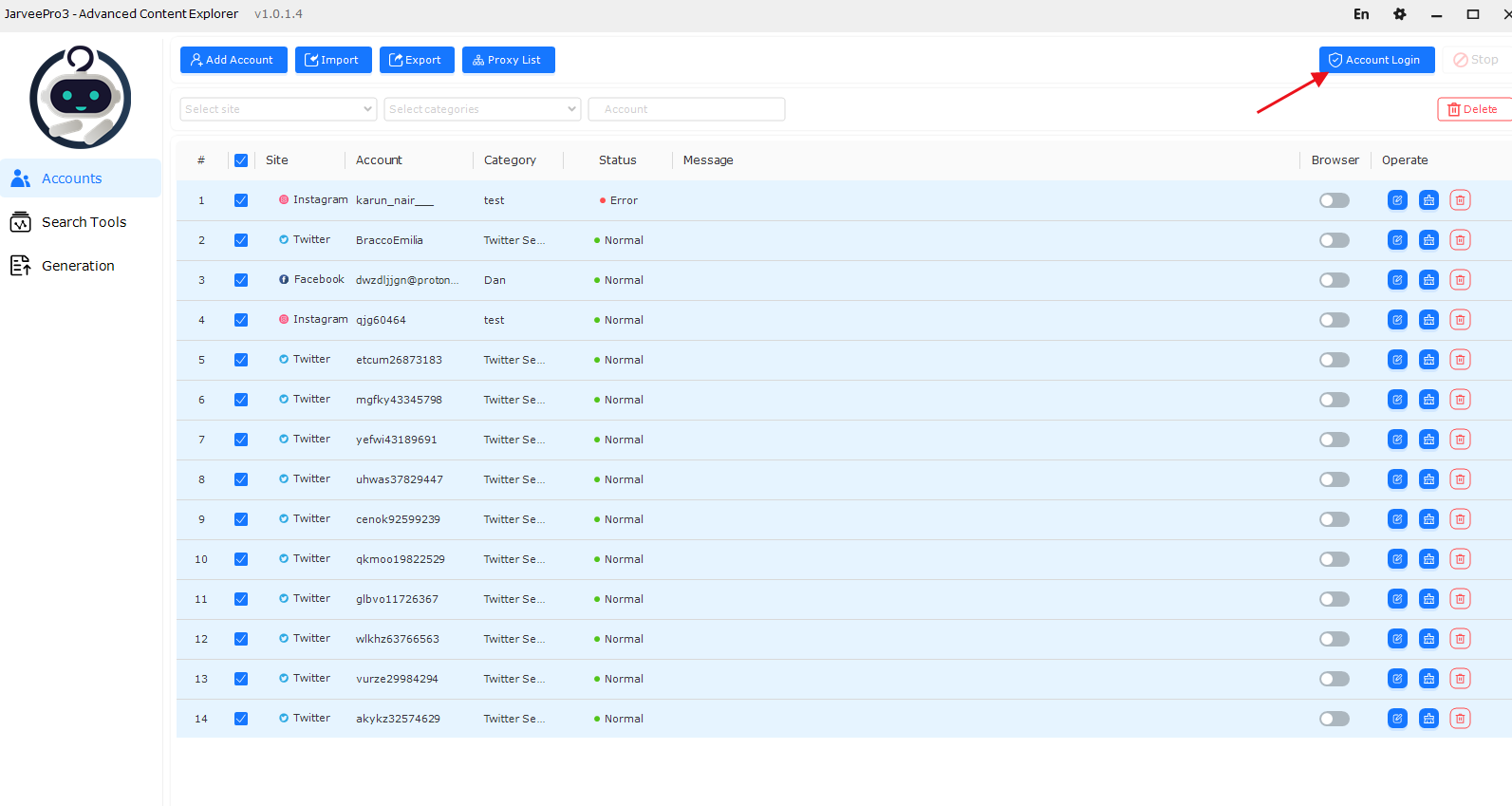
Here’s how to fix it
Correct Steps to Fix the Issue:
| Step | Action | Description |
|---|---|---|
| 1. Open the Accounts tab | Go to the left sidebar and select Accounts. | You’ll see all imported accounts listed. |
| 2. Select the account(s) | Check the box next to the account you want to activate. | Example: Select “Facebook – acc2.” |
| 3. Click “Account Login” | Click the blue Account Login button at the top right. | This will open a login window to verify the session. |
| 4. Wait for the Status to show “Normal” | Once login succeeds, the Status column will display “Normal” with a green dot, and the Message will show “SUCCESS.” | This means the account environment is now active. |
| 5. Return to your AI Comment Campaign | Now that the account status is Normal, rebind it to your campaign and re-run. | The campaign should now execute normally. |
Additional Tips:
“Account Login” is essential — it’s how JarveePro validates cookies, fingerprints, and the session environment.
If your account shows “Unchecked” or “Failed,” you must re-login before running any AI or Content Explorer features.
Always confirm the green “Normal” status before launching any AI-driven campaign (Comment, Like, or Message).
As shown in the screenshot:
You can see that
Status: Normal
This is exactly what you need to achieve before your AI comment campaign will run successfully.
Summary
| Question | Main Takeaway |
|---|---|
| Dedicated Residential IP | Safe if used for one identity across FB/IG/X. |
| AI Agent vs Monitor | Monitor detects; AI Agent acts. |
| Comment Campaign Error | Usually due to missing normal login status. |
Summary
JarveePro’s AI features (AI Agents, GPT integration, and intelligent commenting) are designed to mimic real human behavior — but their success depends on correct account setup. Always ensure that:
Account are logged in.
AI modules are connected properly under “JarveePro Content Explorer.”
You run small-scale tests before full campaign automation.