



How to Prevent Duplicate Actions Using the JarveePro Scheduler
Introduction
Duplicate actions are one of the most common issues users face when running scheduled campaigns in JarveePro—especially when looping tasks like Facebook friend requests, Instagram comments, or content-based actions.
Many users assume the scheduler should “remember” where it left off. In reality, the new JarveePro Scheduler works based on task records, not sequence memory.
This article explains why duplicates happen, how the new scheduler logic works, and exactly how to configure it to prevent repeated actions.
Why Duplicate Actions Happen
JarveePro does not create duplicate actions by default.
Duplicates only occur when the user enables Reset/Cleanup mode, which is designed for looping campaigns such as story views or video watches.
By default:
The scheduler restarts the campaign
Previously completed targets won't be reprocessed
This behavior is intentional, not a bug
The key lies in task record handling.
Understanding the New JarveePro Scheduler Logic
In the new scheduler UI, each campaign run creates task records.
These records determine:
Which actions were completed
Which targets were already processed
Whether the campaign starts fresh or continues logically
Critical Option: Task Record Cleanup
Inside the scheduler settings, you’ll see this option:
☐ Clean up completed task records when starting a task
This checkbox controls duplicate behavior.
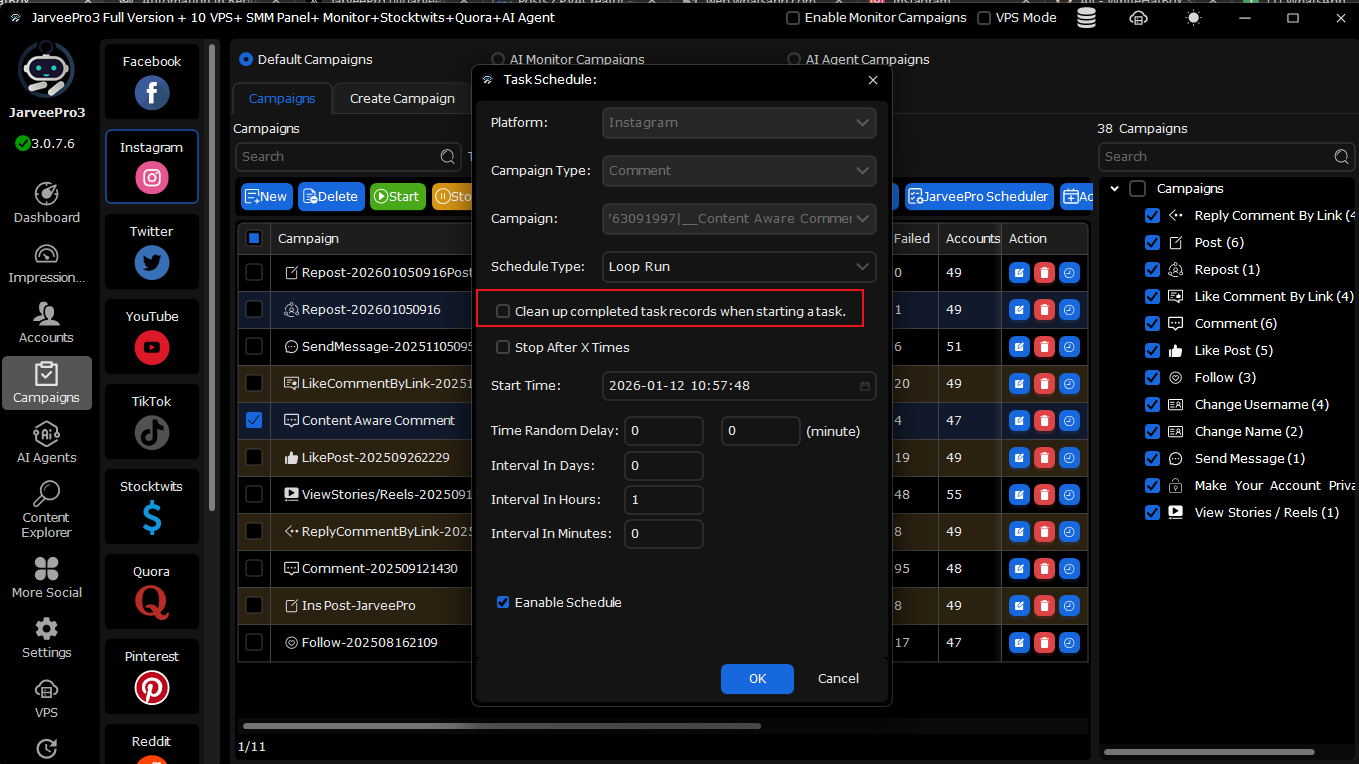
How the “Clean Up Completed Task Records” Option Works
✅ When ENABLED
All previous task records are deleted
Campaign starts from the beginning
Duplicates WILL happen
Best for:
Engagement farming
Repeating actions on purpose
Evergreen campaigns
❌ When DISABLED (Recommended)
Completed targets are remembered
Scheduler skips already-processed users
Campaign continues naturally
Duplicates are PREVENTED
Best for:
Facebook friend requests
DM campaigns
Lead-based workflows
Sequential target lists (A → B → C)
👉To prevent duplicates, this option must remain UNCHECKED
Correct Scheduler Setup to Prevent Duplicate Actions
Step-by-Step Configuration
Open Campaign → Scheduler
Select:
Schedule Type: Loop Run
DO NOT check:
❌ Clean up completed task records when starting a task
Set your interval (hours or minutes)
Enable Scheduler
That’s it.
JarveePro will now remember completed actions and avoid duplicates.
Important Clarification: Scheduler vs Content Explorer
⚠️ The scheduler only applies to campaigns, not Content Explorer searches.
Content Explorer:
Uses platform rules
May re-scan content
Has separate duplicate controls
Scheduler:
Controls campaign execution
Relies on task records
Trying to apply scheduler logic to Content Explorer will not work.
Common Use Cases & Best Practices
Facebook Friend Requests
Upload target profile URLs once
Disable task record cleanup
Scheduler continues target-by-target without repeats
Instagram Comment Campaigns
Works best with Content Aware Comment
Avoid aggressive loop intervals
Use delays
High-Volume Campaigns
Use VPS with sufficient RAM/CPU
Avoid excessive browser instances
Scheduler logic remains consistent regardless of scale
Summary
Duplicate actions are caused by task record cleanup
JarveePro Scheduler relies on task history
Disable cleanup to prevent duplicates
Scheduler applies only to campaigns, not Content Explorer
Proper configuration ensures smooth, sequential execution