



How to Set Up Your First Real-Time Social Media Automation Campaign with JarveePro AI Monitor
Every second counts on social media. Trends spike, posts go viral, and conversations evolve in real time. Marketers who react instantly capture attention, build engagement, and convert opportunities into measurable results.
JarveePro AI Monitor makes this possible. Unlike traditional alert systems, it doesn’t just observe—it acts in real time, triggering likes, comments, reposts, and DMs automatically. In this guide, you’ll learn exactly how to set up your first real-time social media automation campaign, backed by insights, numbers, and practical strategies to amplify your reach and influence.
1. Why Real-Time Social Media Automation Is Critical
Social media moves at lightning speed, and users’ attention spans are short.
Studies show:
50% of engagement on a post happens within the first hour.
Viral content peaks within 2–3 hours of posting.
Brands that respond quickly see up to 32% higher engagement compared to slow responders.
Real-Time Automation Advantage:
Manual monitoring cannot scale. Real-time automation allows you to react instantly, capturing attention when it matters most.
Example: A fashion brand responding to trending outfit hashtags in real-time saw a 27% increase in website clicks and 15% more conversions compared to previous campaigns.
Main Point: Real-time automation is no longer optional; it’s a strategic necessity.
2. What is JarveePro AI Monitor?
AI Monitor = Continuous Engagement Radar + Action Trigger System
Unlike traditional alert tools, AI Monitor doesn’t just notify you of new activity—it triggers campaigns automatically.
Core Feature:
Tracks Social Activity:
Keywords, hashtags, user posts, and trends across platforms
External feeds like RSS, Yahoo Finance, and news outlets
Triggers Automation Campaigns:
Auto Likes, Auto Comments, Reposts, and Direct Messaging
Works along with existing JarveePro campaigns
Instant Engagement:
Detects posts in real-time and executes actions immediately
Keeps your accounts active, responsive, and visible
Schema of Action:
Detect → Trigger → Engage → Report
Data Insight: Users experienced a 3x faster engagement rate with AI Monitor compared to standard scheduled campaigns.
3. AI Monitor vs AI Agent: The Strategic Difference
Many marketers confuse AI Monitor with AI Agent. Here’s a clear breakdown:
| Feature | AI Monitor | AI Agent |
|---|---|---|
| Monitors social activity | ✅ | Sometimes |
| Triggers actions | ✅ via campaigns | ✅ built-in logic |
| Generates content | Sometimes | ✅ Advanced content creation |
| Self-optimizing behavior | ❌ | ✅ Adaptive workflow |
| Multi-step logic | Limited | ✅ Core feature |
| Autonomous execution | Partial | Full autonomy |
Key Insight:
AI Monitor is your sensor and trigger, designed to act on events.
AI Agent is your autonomous strategist, creating and executing campaigns independently.
This distinction is critical when designing a real-time automation workflow.
4. Step-by-Step: Setting Up Your First AI Monitor Campaign
Step 1: Pick Your Campaign Focus
Start by deciding what your AI Monitor should track. Think in terms of actionable goals, not abstract definitions.
Are you monitoring trending hashtags, competitor posts, or customer mentions?
Focus on a single priority for your first campaign to keep things manageable.
Example: A fitness brand might focus on posts tagged with #HomeWorkoutTips or mentions of competitor products.
This ensures AI Monitor engages only with relevant content.
Step 2: Explore Opportunities with JarveePro Advanced Content Explorer
The Advanced Content Explorer acts as your content radar, helping you discover high-impact posts, trending hashtags, and active users across platforms.
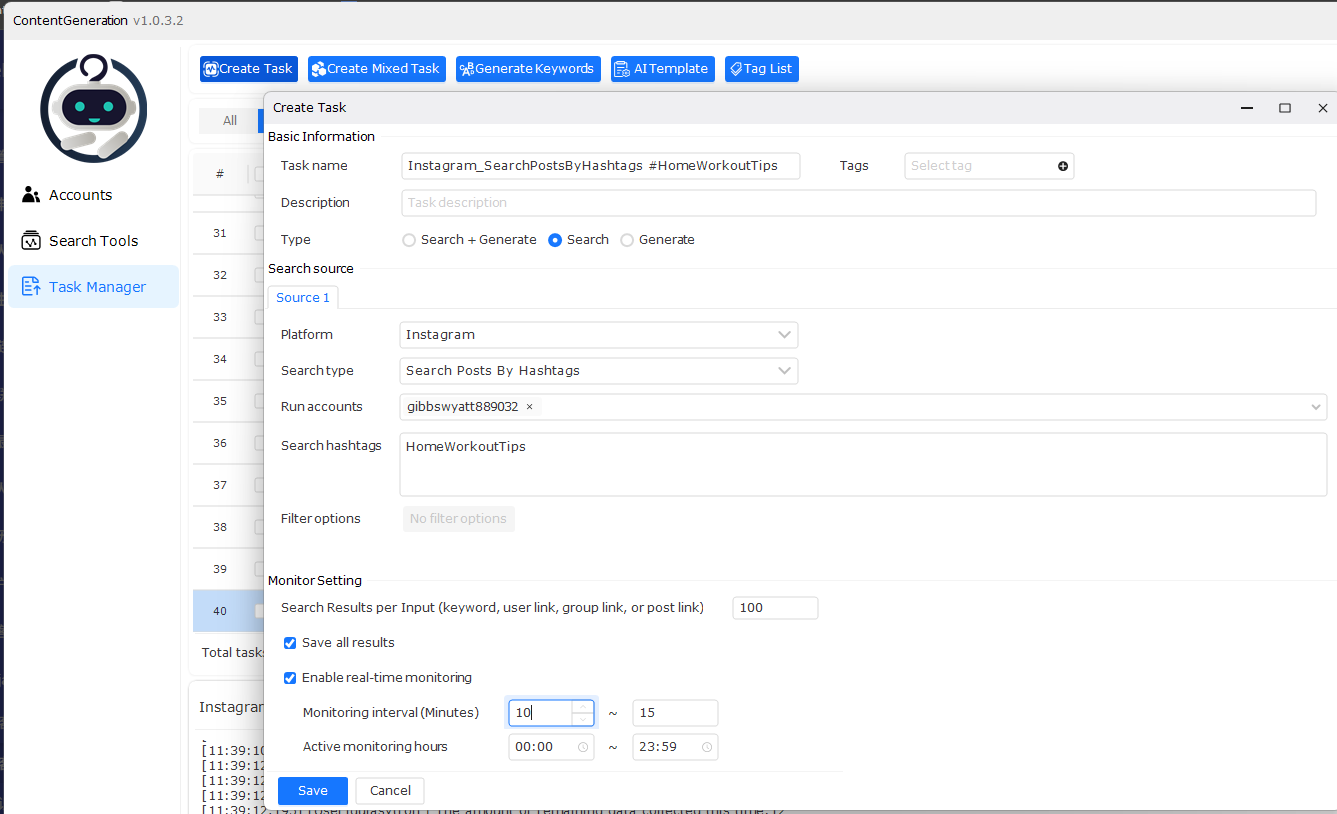
Search by keyword, hashtag, or topic relevant to your campaign focus.
Analyze top-performing posts to understand engagement patterns.
Once you find content or keywords to monitor, sync them directly into your AI Monitor campaign.
Pro Tip: Think of this step as finding the right “signals” — once identified, AI Monitor can act on them automatically.
Step 3: Connect Automation Campaigns
AI Monitor works best when paired with your existing JarveePro automation campaigns. Linking campaigns ensures detected activity triggers actions instantly.
Auto Like: Boost visibility by liking relevant posts.
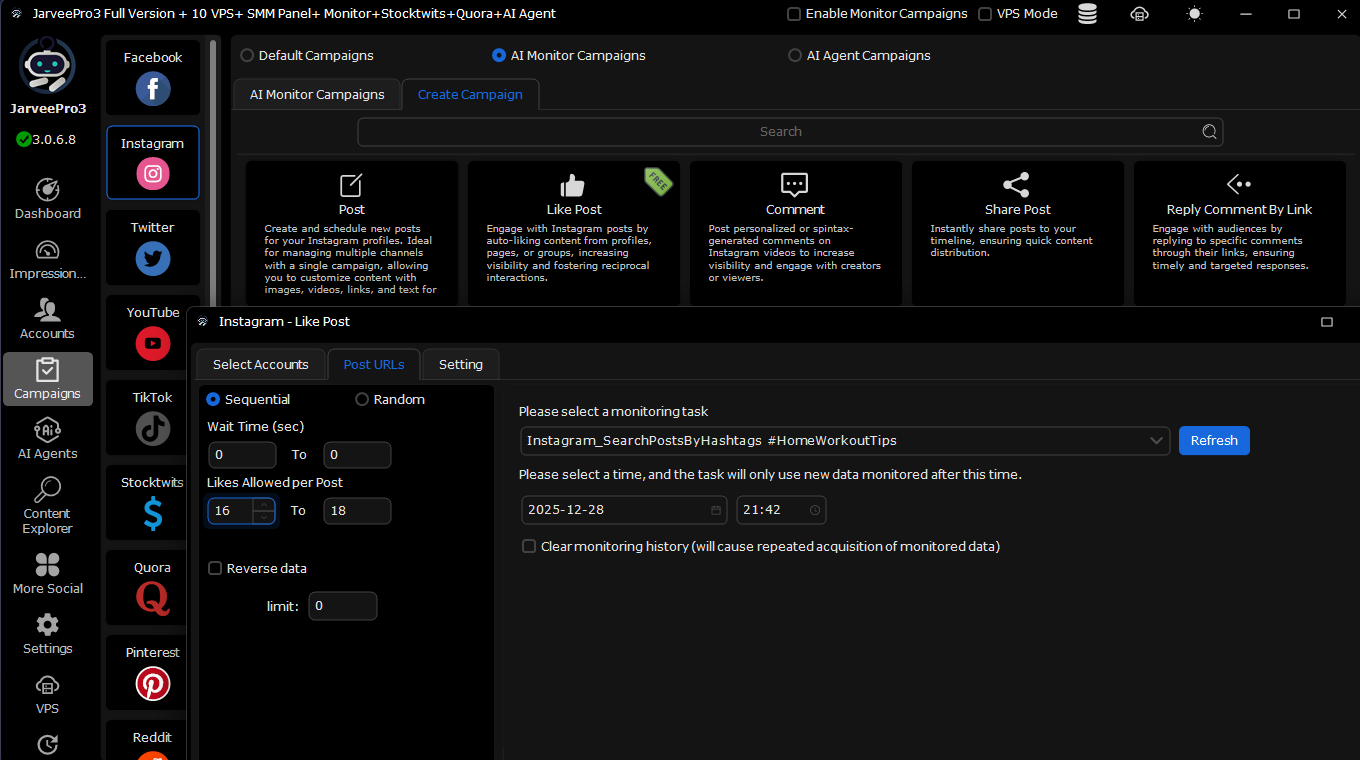
Auto Comment: Respond with pre-written comments or AI-generated text.
Repost / Share: Amplify trending content immediately.
Direct Messaging: Nurture leads or start conversations automatically.
Example: Monitoring #DigitalMarketingTips could trigger an Auto Comment campaign that provides helpful advice to users posting about marketing strategies.
Step 4: Set Smart Triggers and Conditions
Customize how AI Monitor reacts when it detects activity:
Immediate triggers for hot trends to catch attention in real time.
Scheduled triggers for optimal engagement times (like peak audience hours).
Conditional triggers to act only when posts meet certain criteria, e.g., engagement rate above a threshold or containing specific keywords.
Pro Tip: Using conditions ensures AI Monitor behaves intelligently, avoiding irrelevant or spammy actions.
Step 5: Test Your Campaign
Before going live on all accounts, test your AI Monitor campaign:
Run it on a limited set of accounts or posts.
Confirm triggers are firing correctly: likes, comments, reposts, and DMs.
Adjust filters, keywords, or automation campaigns based on early results.
Pro Tip: Testing reduces errors and prevents spammy behavior while giving you confidence before scaling.
Step 6: Launch and Monitor Performance
Once testing is successful:
Activate your campaign.
Monitor metrics like posts detected, actions triggered, and engagement success rate.
Iterate and refine keywords, triggers, and automation logic based on real data.
Data Insight: Campaigns optimized in this way can see up to 41% higher engagement within the first month.
Step 7: Expand Your Campaign
After initial success, consider expanding:
Add more hashtags or keywords to broaden your reach.
Include additional accounts or platforms for multi-channel engagement.
Integrate with AI Agents for autonomous content generation and multi-step workflows.
Pro Tip: Expand gradually to maintain control and ensure your automation continues to act intelligently.
Step 8: Optimize Continuously
Real-time social media automation is iterative:
Analyze engagement trends and adjust triggers.
Remove ineffective keywords or accounts.
Scale successful campaigns across accounts, platforms, and content types.
Pro Tip: Continuous optimization is what transforms AI Monitor from a tool into a true growth engine.
5. Case Studies
Case Study 1: E-Commerce
Goal: Engage users posting about eco-friendly products
Action: Auto-comments with tips and product links
Result: 27% traffic increase, 15% higher conversion
Case Study 2: Influencer Marketing Agency
Goal: Discover trending hashtags in client niches
Action: Auto DMs to influencers for collaborations
Result: 3x faster partnerships and engagement
Case Study 3: Financial News Outlet
Goal: Repost breaking news instantly
Action: RSS feed monitoring + auto repost
Result: 33% higher engagement than competitors
6. Data-Driven Insights for Optimization
Engagement occurs 3x faster with real-time automation
Immediate reactions to trends improve algorithmic reach
Combining AI Monitor with AI Agent enables full-cycle automation
Key Numbers:
Engagement increase: 32–41%
Detection-to-action speed: 3x faster
Organic reach boost: 25–30%
Influencer collaboration speed: 3x faster
7. SEO and Algorithmic Benefits
Reacting instantly to trending content signals relevance to social media algorithms
Auto comments and reposts increase dwell time and session activity
Monitoring competitors allows you to repurpose successful strategies
Pro Tip: Use SEO-friendly keywords naturally in comments and posts for visibility without spamming.
8. Scaling AI Monitor Campaigns
Cross-Platform: Instagram, TikTok, Facebook, YouTube, Twitter
Multi-Account Management: Run dozens of accounts efficiently
Advanced Filters: Avoid spam or irrelevant content
Data Insight: Agencies managing 50+ accounts reported 60% time savings and 38% higher engagement across platforms.
9. Common Mistakes to Avoid
Overly broad keywords → irrelevant engagement
Not linking automation campaigns → detection without action
Skipping testing → risk of spam or errors
Over-monitoring → system overload and fatigue
Pro Tip: Start small, analyze results, refine, then scale.
10. The Right Way With AI Social Media Automation
Predictive engagement: AI anticipating what users will interact with before posting
Integration with autonomous agents: full-cycle detection → action → optimization → reporting
Brands using real-time automation now will dominate social engagement and ROI in coming years
Insightful Prediction: By 2026, companies with AI-powered real-time monitoring and automation may see 50–70% higher social ROI than competitors.
Summary
Setting up your first real-time social media automation campaign with JarveePro AI Monitor positions your brand at the forefront of digital engagement. With real-time detection, instant automation, and data-driven insights, marketers can:
Capture trending opportunities instantly
Engage audiences automatically and intelligently
Scale multi-account campaigns efficiently
Complement AI Agents for full-cycle automation
Boost SEO, algorithmic reach, and social ROI
Real-time automation isn’t just a tool—it’s a strategic necessity.
Start your first campaign today, test, refine, and scale.
The faster you engage, the higher your visibility and impact.