



Social Media Content Automation: How to Build a Scalable Content Workflow
Introduction
There is a point in almost every creator's journey when social media stops feeling like a creative activity and starts feeling like operations.
At first, publishing is simple.
You create a post, write a caption, publish it, respond to comments, and move on.
Then the audience grows.
You add another platform. Then another. You start producing more videos. You want to repurpose content. You have campaigns running at the same time. You need different publishing schedules. You have several accounts to monitor.
Suddenly, the problem isn't how to create content.
The problem is how to manage everything that happens to that content after it is created.
That is where social media content automation becomes valuable.
But there is an important distinction between simply scheduling posts and building an actual content automation workflow.
A scheduler answers: "When should this post go live?"
A scalable content workflow asks much bigger questions:
How should content be organized?
Where should it be published?
When should it be published?
Which repetitive tasks can be automated?
How should publishing activity be monitored?
How can the workflow scale without creating more administrative work?
For creators, influencers, personal brands, agencies, and growing marketing teams, these questions matter more as content volume increases.
This guide explains how to build a scalable social media content workflow and where automation software such as JarveePro can fit into that process.
What Is Social Media Content Automation?
Social media content automation is the use of software and predefined workflows to reduce repetitive work involved in managing and publishing social media content.
It can include activities such as:
Organizing content for publishing
Scheduling posts
Managing publishing campaigns
Distributing content across supported social accounts
Monitoring automated activity
Repeating predefined workflows
Using AI to assist with certain content-related tasks
The important point is that content automation is broader than post scheduling.
Scheduling is one component.
A complete workflow connects multiple operational steps so that the creator or marketer doesn't have to manually coordinate every repetitive action.
Think of it this way:
Manual process:
Create → Prepare → Log in → Publish → Repeat → Check → Repeat again
Automated workflow:
Create → Organize → Configure → Schedule → Automate → Monitor
The second workflow doesn't eliminate human involvement.
It removes unnecessary repetition.
Why Content Creation Is Not the Only Bottleneck
The internet has made content creation easier than ever.
AI can help generate ideas. Video tools can accelerate editing. Templates can speed up design. Creators can repurpose one idea into multiple formats.
Yet many teams still spend significant time performing the operational tasks surrounding that content.
For example, imagine a creator produces a short video.
The creative work might take an hour.
But afterward, they may still need to:
Prepare the caption.
Decide when to publish.
Add the content to a schedule.
Publish it to different accounts or platforms.
Check whether the publishing workflow completed correctly.
Monitor the resulting activity.
Repeat the process tomorrow.
As content volume increases, these small tasks accumulate.
This creates a common problem:
The more successful the content strategy becomes, the more difficult it can become to operate manually.
That is why scalability isn't just about creating more content.
It is about creating a system capable of handling more content without requiring a proportional increase in repetitive manual work.
What Does a Scalable Social Media Content Workflow Look Like?
A scalable workflow can be thought of as several connected stages:
Plan → Create → Organize → Schedule → Publish → Monitor → Improve
Each stage has a different purpose.
1. Plan
Before automation begins, you need to know what you are trying to accomplish.
A content workflow might include:
Educational content
Product content
Promotional campaigns
Community content
Short-form video
Evergreen content
Time-sensitive posts
Without a clear content strategy, automation simply helps you publish more randomly.
Automation should support a strategy rather than replace one.
2. Create
This is where human creativity remains especially important.
Creators should determine:
What they want to say
Who they want to reach
Their brand voice
Their creative direction
What makes the content valuable
AI and automation can assist with parts of the process, but the underlying creative strategy still matters.
A useful principle is: Automate the workflow, not the identity.
Your audience should still recognize the person, brand, or perspective behind the content.
3. Organize
Once you have more content, organization becomes critical.
You may need to distinguish between:
Different campaigns
Different platforms
Different accounts
Different content types
Different publishing schedules
Without organization, automation can actually make things more confusing.
The objective isn't to create a giant pile of scheduled posts.
The objective is to create a system where you know what is being published, where, and why.
4. Schedule
Scheduling is one of the most familiar forms of social media automation.
Instead of manually publishing every piece of content, you prepare the publishing schedule in advance.
This can help creators maintain consistency without constantly stopping their creative work to perform repetitive publishing tasks.
But scheduling alone has limitations.
If you are managing more complicated workflows, you may need more than a calendar.
You may need campaign management, account organization, content management, and monitoring as well.
Why Social Media Scheduling Alone Is Not Enough
Scheduling is useful.
But it doesn't solve every operational problem.
Imagine a creator who has:
Multiple content campaigns
Multiple social accounts
Different publishing schedules
A growing content library
Repetitive publishing tasks
A need to monitor automated activity
A simple calendar doesn't necessarily solve the organizational problem.
This is why the market has moved toward broader social media automation platforms rather than treating scheduling as the entire solution.
The question changes from: "Can I schedule my posts?" to: "Can I build a repeatable system for managing my social media content?"
That is a much more useful question.
What to Look for in Social Media Content Automation Software
If you are evaluating automation software, don't start with the longest feature list.
Start with the workflow.
Ask whether the software helps with the operational problems you actually have.
Content Management
Can you organize the content associated with your campaigns and publishing workflows?
Good organization becomes increasingly important as content volume grows.
Scheduling
Can you plan publishing activity instead of manually repeating the same process?
Scheduling reduces repetitive work and makes publishing easier to manage.
Campaign Management
Can different content strategies be managed separately?
This matters when you don't want every account or campaign to follow exactly the same workflow.
Multi-Account Management
If your work involves multiple social accounts, account organization becomes an operational requirement rather than a nice-to-have.
Monitoring
Automation should not mean abandoning visibility.
Monitoring allows you to understand what your automated workflows are doing and identify issues that require attention.
AI Assistance
AI can help with parts of the content workflow, particularly where repetitive decisions or content-related tasks are involved.
The important question is not simply whether software has "AI."
Ask: What does the AI actually help me accomplish?
Configurable Workflows
Different campaigns may require different schedules, content, and actions.
Flexible configuration is therefore more useful than a system that assumes every account should operate identically.
When Should You Use Social Media Content Automation Software?
Not everyone needs extensive automation.
If you're managing one account and publishing occasionally, manual publishing may be perfectly reasonable.
Automation becomes more attractive when the operational workload starts consuming time that could be spent elsewhere.
You may benefit from automation when:
You publish frequently.
You manage content across several social platforms.
You repeatedly perform the same publishing tasks.
You manage multiple campaigns.
You need more consistent scheduling.
Your content library is growing.
Monitoring multiple workflows manually is becoming difficult.
You want to spend more time creating and less time performing repetitive operations.
The key signal isn't a particular number of posts or accounts.
It is repetition.
If you repeatedly perform the same task, that task may be a candidate for automation.
How Creators Can Build a Scalable Content Workflow
Let's turn the theory into a practical process.
Step 1: Identify Repetitive Tasks
Write down everything you do between creating content and measuring its performance.
Don't assume every task needs automation.
Look for repetitive operational activities.
For example: "I prepare and schedule the same type of content every day."
That is a strong candidate for workflow automation.
Step 2: Separate Creative Work From Operational Work
This distinction can dramatically improve your workflow.
Creative work
Ideas
Storytelling
Brand voice
Creative direction
Audience strategy
Operational work
Organizing content
Scheduling
Publishing
Repeating predefined tasks
Monitoring workflows
Automation is particularly useful for the second category.
This allows creators to spend more time on the work that actually requires their judgment.
Step 3: Create Repeatable Campaigns
Instead of treating every post as a completely separate event, group related content into campaigns or workflows.
For example:
Product Education Campaign
→ Educational content
→ Publishing schedule
→ Target accounts
→ Monitoring
Or:
Weekly Creator Content
→ Short-form videos
→ Scheduled publishing
→ Multiple destinations
→ Activity monitoring
The exact structure will depend on your strategy.
The principle is simple: Turn repeated manual processes into repeatable workflows.
Step 4: Automate the Repetitive Layer
Once the workflow is clear, automate the parts that don't require constant human intervention.
This is where a platform such as JarveePro can become useful.
Instead of manually coordinating every repetitive publishing task, you can configure campaigns and automation workflows around your content strategy.
The objective isn't to automate blindly.
It is to create a workflow that is predictable and manageable.
Step 5: Keep Monitoring in the Loop
One of the biggest mistakes in automation is treating it as a "set it and forget it" system.
Automation should reduce repetitive work, but you should still maintain oversight.
Monitor your campaigns and review your workflows regularly.
If something changes — your content strategy, platform requirements, campaign objectives, or account setup — your automation should be reviewed as well.
This is especially important as your workflow grows more complicated.
How JarveePro Fits Into a Scalable Content Workflow
JarveePro is designed to help users manage and automate social media workflows rather than treating every publishing task as a separate manual activity.
For a creator or marketer building a scalable workflow, JarveePro can sit in the operational layer between content preparation and ongoing social media management.
A simplified workflow looks like this:
Content Strategy
↓
Content Creation
↓
Content Organization
↓
JarveePro Campaign & Scheduling
↓
Automated Publishing & Workflows
↓
Monitoring
The value is not simply that software can perform an action automatically.
The bigger benefit is being able to create a repeatable operational system around your content.
JarveePro also includes AI-oriented capabilities that can support broader automation workflows, allowing users to move beyond the idea that social media automation is nothing more than a post scheduler.
For creators who are already producing substantial amounts of content, this distinction matters.
The challenge becomes less about finding another place to schedule a post and more about building a system that can support the entire publishing operation.
Social Media Content Automation vs. Manual Publishing
Neither approach is universally better.
The right choice depends on your workflow.
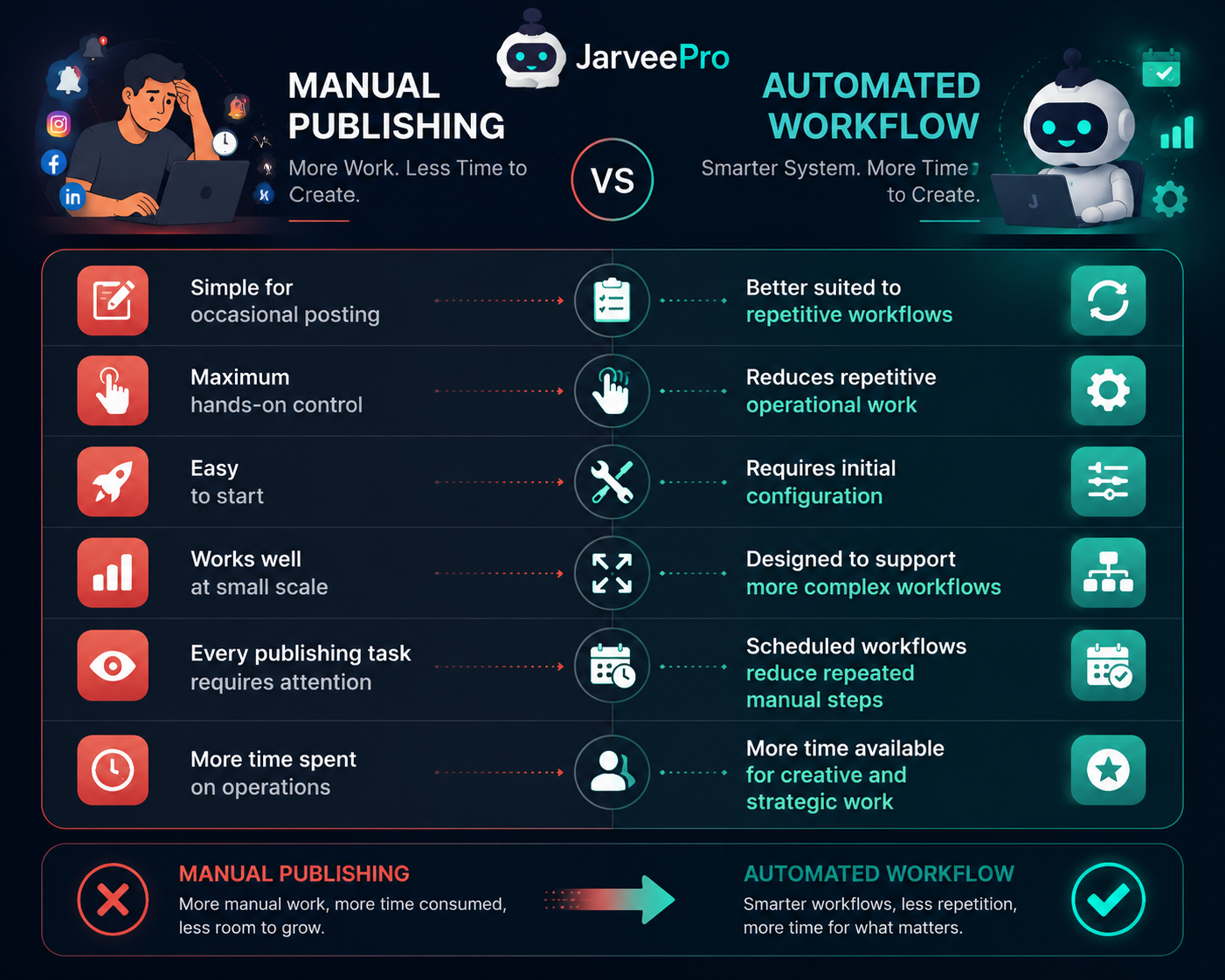
The important point is that automation doesn't have to replace manual work completely.
A hybrid approach is often more practical.
You can automate repetitive operational tasks while keeping creative decisions and strategic oversight under human control.
Does Social Media Automation Replace the Creator?
No — and it shouldn't.
A creator's value doesn't come from clicking the Publish button.
It comes from:
Having ideas
Understanding an audience
Building a recognizable voice
Creating valuable content
Developing a brand
Making strategic decisions
Automation handles a different part of the equation.
It can help reduce the operational burden surrounding that creative work.
This leads to a useful way of thinking about automation: The goal isn't to make your social media less human. The goal is to give humans less repetitive work.
That distinction is particularly important for influencers and personal brands.
Your personality should remain yours.
Your workflow doesn't have to be manual.
How to Scale Content Without Losing Control
Scaling automation isn't simply a matter of turning on more features.
A healthier approach is incremental.
Start with one workflow
Build a simple process and make sure it works.
Monitor it
Confirm that the workflow behaves as expected.
Document what works
Once a process is stable, make it repeatable.
Add another workflow
Expand gradually rather than changing everything at once.
Review regularly
Your content strategy will change over time. Your automation should change with it.
This approach also makes troubleshooting easier.
If you change many variables simultaneously, it becomes much harder to determine what caused an unexpected result.
Common Mistakes in Social Media Content Automation
Automating Before Building a Strategy
Software cannot fix an unclear content strategy.
If you don't know what you're publishing or why, automation simply increases the speed of an inefficient process.
Treating Every Account Exactly the Same
Different campaigns may have different goals.
Your workflow should reflect those differences instead of assuming that one configuration fits everything.
Focusing Only on Publishing
Publishing is only one part of content operations.
Organization and monitoring matter too.
Automating Too Aggressively
More automation isn't automatically better.
Start with a manageable workflow and expand it as you understand the results.
This makes the system easier to control and troubleshoot.
Forgetting Human Oversight
Automation should reduce repetitive work, not eliminate responsibility.
Keep reviewing campaigns and adjusting your workflows when circumstances change.
The Future of Social Media Automation Is the Workflow
The social media automation conversation used to revolve around one basic question: "Can this tool schedule my posts?"
That question is becoming less interesting.
Creators now have access to more content creation tools than ever. AI can generate ideas, write drafts, assist with videos, and accelerate production.
That means the next bottleneck is increasingly operational.
How do you manage everything you create?
The answer isn't necessarily more content.
It's a better system.
A modern social media workflow may combine:
Human creativity
AI-assisted content work
Content organization
Automated publishing
Monitoring
Human oversight
That is where social media content automation becomes genuinely useful.
Conclusion
The goal of social media automation shouldn't be to make your accounts operate without people.
It should be to make the people behind those accounts more productive.
For creators and growing marketing teams, the biggest opportunity is often not automating the creative process. It is automating the repetitive operational work that surrounds it.
If you're publishing more content, managing more campaigns, or working across more social accounts, ask yourself: Which parts of my content workflow still require me to do the same thing manually every day?
Those are the places to start.
Build the workflow first.
Automate the repetitive parts second.
Keep human judgment where it matters.
And as the operation grows, use software that can grow with the workflow rather than forcing your entire strategy into a simple scheduling calendar.
That is the real promise of social media content automation: not more automation for its own sake, but a scalable system that gives creators more time to create.
Related JarveePro Resources
If you're exploring social media automation, the next step is to look at how individual parts of the workflow — including scheduling, content management, account management, monitoring, and AI-assisted automation — can work together in a broader system.
JarveePro is built around this broader approach to social media management, helping users move beyond isolated manual tasks toward configurable, repeatable workflows.