



JarveePro Scheduler — Advanced Use Cases & Deep Answers
If you’ve already learned the basics from our Task Scheduler beginner guide, this article will take you a step further.
JarveePro’s Scheduler is not just a timer — it’s a full automation controller that can coordinate thousands of posts, reschedules, and campaign loops with precision. Here, we’ll dive into real user cases and advanced behaviors to help you get the most out of it.
While the basic guide explains how to create and run schedules, many power users have deeper questions once they start using it daily. This article answers the most common real user cases and advanced scenarios from our support channel.
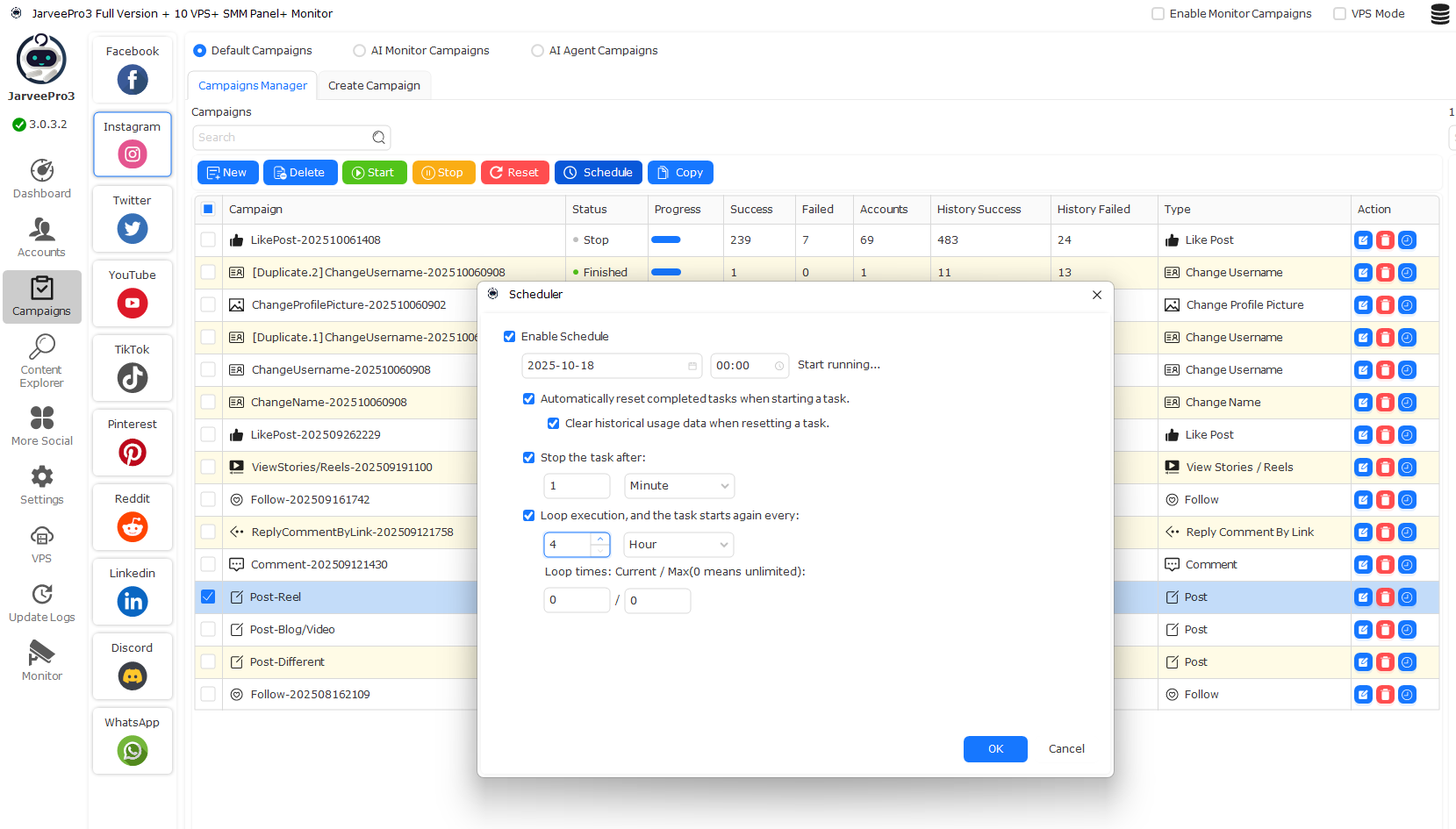
Case 1: “If I tick ‘Automatically Reset Completed Tasks’ — will it repost old content?”
Short answer:
No, unless you also enable “Clear Historical Usage Data When Resetting a Task.”
Detailed explanation:
The “Reset Completed Tasks” option clears the current session data and prepares the campaign for a new run.
JarveePro will not repost the same content if your campaign settings restrict reusing photos, captions, or videos.
Only if you also check “Clear Historical Usage Data” will JarveePro forget past posting records and allow the same content to be reused.
Tip:
Use both options together only when you intentionally want to recycle old posts.
Case 2: “What happens if I schedule the same campaign multiple times a day?”
When you set Loop Execution (e.g., every 4 hours), JarveePro will repeat the task based on your defined cycle.
Example:
Task starts at 00:00, repeats every 4 hours
It will run at 00:00, 04:00, 08:00, 12:00, 16:00, and 20:00.Each time, it checks for new unposted content and posts accordingly.
Pro Tip:
Avoid scheduling overlapping times between multiple campaigns that use the same accounts to prevent rate-limit issues or flagged behavior.
Case 3: “If I change content while a task is paused — will it take effect when resumed?”
Yes.
When you pause a scheduled task, all campaign parameters (like source lists, captions, or new videos) are re-read once you resume.
This allows mid-cycle edits without restarting from scratch.
However:
If you had “Automatically Reset Completed Tasks” enabled, the campaign will start fresh, and completed items won’t be recognized as already posted.
Case 4: “How does JarveePro handle time zones when scheduling tasks?”
JarveePro always uses your local computer time zone, not UTC or the proxy’s region.
If you’re running accounts from multiple countries, plan your schedule using your system time.
Example:
If your PC is set to GMT+8 and you schedule 10:00, your post goes live at 10:00 local time — regardless of whether the account uses a U.S. or Brazil proxy.
Case 5: “Can I combine Task Scheduler with Auto Stop Conditions?”
Yes — they work beautifully together.
Example setup:
You schedule posting every 3 hours.
You also set “Stop task after" 1 Minute, 1 Hour, 1 Day or More.
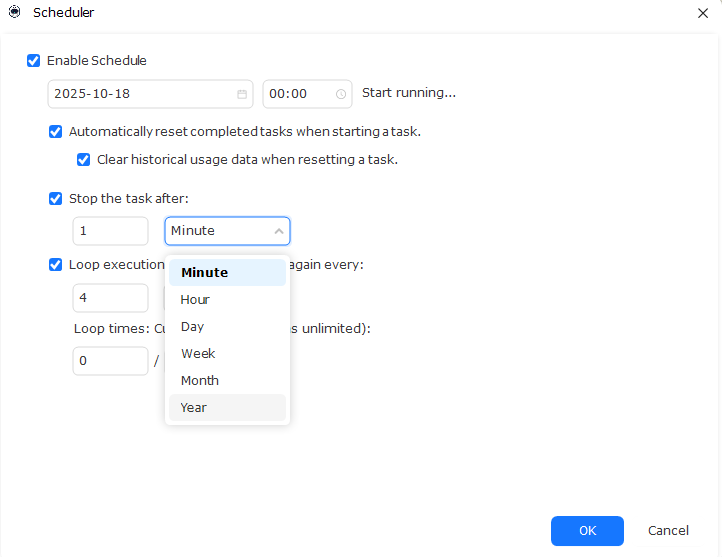 JarveePro will check the stop condition each loop. Once triggered, the schedule pauses automatically, ensuring your actions stay within safety limits.
Case 6: “Why do my tasks keep starting and stopping instantly?”
This usually happens when:
The scheduled start time is in the past.
No valid items are left to process.
Or the system reached your maximum loop count.
Fix:
Double-check the “Start Time”, make sure the content queue is not empty, and either set loop count to 0 (unlimited) or increase it to your preferred number.
Case 7: “How can I schedule posting evenly across all accounts?”
Use the Account Interval Delay and Loop Delay together.
Example:
Post between 10:00 and 22:00
Every 4 hours
Add random delay of 10–30 minutes between accounts
JarveePro will spread actions smoothly throughout the day, avoiding pattern detection.
Advanced Power Tip: Combining Schedulers with JarveePro AI Monitor
If you run AI Monitor (auto-updating sources), the Scheduler can auto-reset and fetch new items each cycle.
This means every time the Scheduler restarts, JarveePro pulls a fresh list of videos, comments, or targets — ideal for viral posting loops.
Summary Table
| Scenario | Setting to Check | Recommended Action |
|---|---|---|
| Avoid duplicate posting | Uncheck “Clear Historical Data” | Keeps posting history |
| Want to recycle content | Enable both reset options | Starts clean every loop |
| Task doesn’t start | Check start time, queue, loop count | Adjust schedule |
| Multi-account posting | Add random delays | Prevent simultaneous actions |
| Frequent resets needed | Keeps content fresh |
Summary
The Scheduler is one of the most powerful automation modules in JarveePro.
Mastering the interaction between reset, loop, and history clearing allows you to:
Automate complex posting strategies
Balance safety and frequency
Scale campaigns efficiently without human supervision