



How to Manage Multiple Google Business Profiles at Scale: A Guide for Agencies and Multi-Location Businesses
Google Business Profile plays an important role in local search visibility.
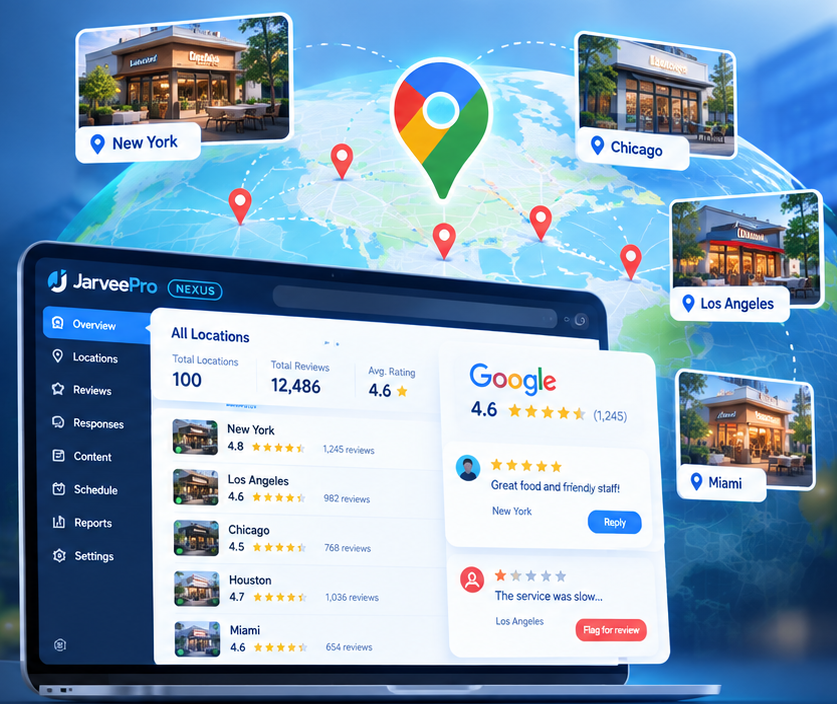
When customers search for a restaurant, salon, retail store, or service provider, Google Search and Google Maps can help them discover nearby businesses, check opening hours, read customer reviews, and find contact information.
For a business with one location, managing its Google Business Profile is relatively straightforward.
But what happens when a business operates 20 locations?
What if a digital marketing agency manages 50 client profiles? Or a restaurant group needs to coordinate information and customer feedback across 100 branches?
Suddenly, a seemingly simple task becomes a significant operational challenge.
Teams need to keep business information accurate, monitor reviews, coordinate responses, identify problems, and ensure that every location receives the appropriate attention.
Managing multiple Google Business Profiles isn't simply about doing the same work more times. It's about creating a reliable system for managing many locations without losing local accuracy or operational control.
In this guide, we'll explore the challenges of multi-location Google Business Profile management, practical ways to organize the work, and how platforms such as JarveePro Nexus can fit into a broader marketing workflow.
1. What Is Google Business Profile Management?
Google Business Profile management involves maintaining a business's information and presence across Google Search and Google Maps.
Depending on the business and its permissions, typical activities may include:
- Updating business information and operating hours.
- Maintaining accurate addresses and contact details.
- Managing business categories and service information.
- Monitoring customer reviews.
- Responding to customer feedback.
- Reviewing profile performance.
- Coordinating updates across multiple locations.
- Keeping information consistent with the actual services offered.
For a local business, these activities help ensure that customers receive accurate information when they search online.
For an agency or multi-location company, however, the challenge extends beyond maintaining an individual profile.
The team must also coordinate responsibilities, standardize procedures, and make sure each location receives the correct information and attention.
This is where multi-location management becomes an operational discipline rather than an occasional administrative task.
2. Why Managing Multiple Google Business Profiles Becomes Difficult
Challenge 1: Every Location Has Different Information
Imagine a restaurant group operating 30 branches.
The locations share the same brand, but each may have different opening hours, contact details, menus, promotions, or temporary closures.
A centralized marketing team needs to maintain consistent brand standards without confusing one location with another.
Copying information between profiles without verification can introduce errors.
For example, a holiday-hours update intended for one branch could be applied incorrectly to another.
The solution begins with a clear source of truth for each location.
Every profile should have a unique identifier, verified business information, and a clearly assigned owner.
Challenge 2: Customer Reviews Arrive Across Multiple Locations
Google reviews can provide valuable information about customer experiences.
But when a business operates across many locations, review monitoring becomes more complicated.
A regional manager may need to identify recurring complaints. A customer service team may need to escalate a serious issue. A local branch manager may need to respond to feedback about a specific service.
Without a consistent process, reviews can go unanswered or be handled by the wrong person.
A better system should help teams organize review-related work by location, urgency, responsibility, and status.
Challenge 3: Agencies Need to Manage Multiple Clients
The problem is especially relevant to local SEO and digital marketing agencies.
An agency might manage Google Business Profiles for restaurants, dentists, salons, hotels, and home-service businesses.
Each client has different brand guidelines, business information, and approval requirements.
The agency must keep these details separate while providing a consistent level of service.
A repeatable workflow can help standardize operations without treating every client as if they were the same business.
Challenge 4: Reporting Becomes Fragmented
When information is spread across different spreadsheets, dashboards, and communication channels, it becomes harder to answer basic questions:
- Which locations have unresolved reviews?
- Which branches need updated business information?
- Who is responsible for the next action?
- Which customer complaints require escalation?
- How much time is the team spending on repetitive tasks?
The solution is not necessarily another spreadsheet.
It's a clear operational structure that helps the team track work and identify what requires attention.
3. How to Organize Multiple Google Business Profiles Efficiently
Before introducing automation, establish a reliable management process.
Step 1: Create a Master Location Database
Maintain a structured record for every business location.
Useful fields include:
| Field | Purpose |
|---|---|
| Location ID | Uniquely identifies each branch |
| Business name | Identifies the location |
| Address | Confirms the physical location |
| Authorized profile reference | Connects the record to the correct Google Business Profile |
| Local manager | Establishes responsibility |
| Opening hours | Records verified operating information |
| Review owner | Identifies who handles customer feedback |
| Approval status | Indicates whether information has been verified |
| Escalation contact | Identifies who handles sensitive issues |
The exact fields will vary by business type.
The important principle is that every location has a clearly defined identity and an accountable owner.
Step 2: Group Profiles by Business Structure
A multi-location company may organize its profiles by:
- Region.
- City.
- Brand.
- Business unit.
- Franchise owner.
- Local marketing team.
An agency may organize its workflows by client and service level.
The grouping structure should reflect how the business actually operates.
Google provides its own mechanisms for managing eligible business groups and locations. Teams should use Google's authorized access and management features where applicable rather than sharing credentials indiscriminately.
Step 3: Establish a Review Management Process
Not every review requires the same response.
A practical process can divide reviews into categories:
Positive feedback: Respond appropriately and acknowledge the customer's experience.
Routine negative feedback: Investigate the issue and provide a relevant, professional response.
Serious complaints: Escalate to an authorized manager before responding.
Potentially sensitive matters: Follow the company's approved privacy, legal, and customer service procedures.
The objective is to ensure that responses are accurate and appropriate rather than simply maximizing the number of replies.
Step 4: Standardize the Workflow, Not Every Response
Consistency is important, but every customer interaction should not sound identical.
Teams can establish approved response principles, tone guidelines, escalation procedures, and quality standards.
For example, a restaurant group may want responses to remain friendly and professional across all branches while allowing each reply to address the customer's actual experience.
Templates can help with routine situations, but they should not replace genuine attention to individual complaints.
Step 5: Measure Operational Performance
Useful measurements include:
- Percentage of reviews receiving an appropriate response.
- Median time to respond.
- Number of unresolved complaints.
- Accuracy of business information.
- Time required to complete recurring administrative tasks.
- Number of issues escalated to regional managers.
These metrics help teams identify bottlenecks and improve the process.
They should be interpreted alongside customer satisfaction and business outcomes rather than treated as proof that a business will rank higher in local search.
4. Can You Automate Google Business Profile Management?
Yes, some parts of the workflow can be automated, but the available options depend on the specific task, account permissions, integrations, and Google's applicable policies.
The first step is to distinguish between activities that can be streamlined and decisions that still require human judgment.
| Activity | Potential approach |
|---|---|
| Organizing location information | Centralized database or management system |
| Assigning review-related tasks | Workflow automation |
| Categorizing incoming feedback | Rules or AI-assisted classification |
| Drafting review responses | AI-assisted writing using verified information |
| Handling sensitive complaints | Human review and approval |
| Monitoring task completion | Workflow records and reporting |
| Publishing supported updates | Authorized tools and supported integrations |
AI can help classify feedback, draft responses, and summarize recurring issues.
However, it should not invent opening hours, prices, services, or other business facts.
If required information is missing, the workflow should pause for verification.
Likewise, automation should not post reviews on behalf of customers, manufacture customer feedback, or attempt to manipulate review ratings.
The purpose of reputation management is to handle genuine customer feedback responsibly.
Why Automation Alone Isn't Enough
Imagine an AI system generating responses to 500 reviews.
If those responses contain incorrect information, ignore serious complaints, or use the wrong location details, faster processing simply creates more problems in less time.
A well-designed workflow needs:
- Verified location information.
- Clear account permissions.
- Location-specific context.
- Appropriate approval requirements.
- Reliable task records.
- A process for correcting mistakes.
For multi-location brands, accuracy and accountability are just as important as efficiency.
5. How JarveePro Nexus Fits into Multi-Location Marketing Operations
Managing Google Business Profiles involves several distinct tasks, and not every platform supports all of them.
This distinction matters.
Google Business Profile has its own management interfaces and authorized integration options. A tool should not be presented as capable of reading reviews, replying to reviews, or changing profile information unless those capabilities are actually supported.
JarveePro Nexus provides a centralized environment for managing account networks and coordinating supported marketing workflows.
For agencies and businesses handling multiple online accounts, that type of operational structure can be valuable.
Depending on the supported configuration, Nexus can help teams organize account inventories, coordinate campaign tasks, and monitor execution.
For businesses exploring a broader automation strategy, it is worth evaluating whether Nexus can support their specific Google Business Profile workflow through an available authorized integration.
Before adopting any solution, verify the precise capabilities required, including:
- Whether it supports Google Business Profile accounts directly.
- Whether it can retrieve or monitor Google reviews.
- Whether it supports authorized review-response workflows.
- Whether profile updates are available.
- Whether human approval can be incorporated.
- Whether actions and results can be tracked.
The right solution is one that supports the specific work your team needs to perform, rather than one that merely promises more automation.
Explore JarveePro Nexus and its available capabilities through the official JarveePro website.
6. Best Practices for Managing Google Maps Reviews at Scale
A successful reputation management process requires more than software.
Keep Every Location's Information Separate
Every review and response should be associated with the correct business location.
Do not rely on a city name in a message as the only check that the underlying profile is correct.
Use Verified Facts in AI Responses
Provide AI tools with approved information about the business, its services, and its customer service policies.
If the answer requires information that has not been verified, route the issue to a human reviewer.
Escalate Serious Complaints
Issues involving safety, discrimination, privacy, legal concerns, or significant service failures should follow an appropriate escalation process.
AI-generated wording should not bypass the people responsible for resolving those problems.
Follow Google's Policies
Use authorized access methods and comply with Google's applicable content, review, and account-management policies.
Do not generate fake reviews, offer prohibited incentives, or automate activity in ways that violate platform rules.
Review the Process Regularly
Check whether the workflow is improving accuracy, response quality, and operational efficiency.
If automation creates additional errors or customer complaints, revise the workflow instead of simply increasing its volume.
7. Conclusion: Build a Scalable System for Local Reputation Management
Managing one Google Business Profile is relatively simple.
Managing dozens or hundreds of locations requires a more structured approach.
Businesses need accurate location records, clear responsibilities, consistent review-handling procedures, and reliable ways to track outstanding work.
Automation can reduce repetitive administrative effort, while AI can help teams organize feedback and prepare responses. Human oversight remains essential when accuracy, customer relationships, or sensitive complaints are involved.
For agencies and multi-location brands, the goal is to create a repeatable process that scales without sacrificing local relevance.
JarveePro Nexus offers an environment for coordinating supported marketing workflows and managing account networks. Businesses evaluating it for Google Business Profile operations should first confirm that the required integrations and actions are available.
Looking to streamline your marketing operations?
Visit JarveePro.com to explore the platform and determine whether its capabilities fit your business workflow.